Skip to content

vedo.colors

colors

colors

build_lut(colorlist, vmin=None, vmax=None, below_color=None, above_color=None, nan_color=None, below_alpha=1, above_alpha=1, nan_alpha=1, interpolate=False)

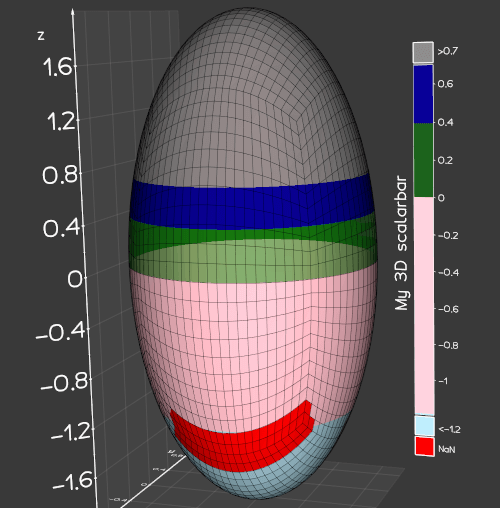
Generate colors in a lookup table (LUT).

Return the vtkLookupTable object. This can be fed into cmap() method.

Parameters:

Name Type Description Default
colorlist list

a list in the form [(scalar1, [r,g,b]), (scalar2, 'blue'), ...].

required
vmin float

specify minimum value of scalar range

None
vmax float

specify maximum value of scalar range

None
below_color color

color for scalars below the minimum in range

None
below_alpha float

opacity for scalars below the minimum in range

1
above_color color

color for scalars above the maximum in range

None
above_alpha float

alpha for scalars above the maximum in range

1
nan_color color

color for invalid (nan) scalars

None
nan_alpha float

alpha for invalid (nan) scalars

1
interpolate bool

interpolate or not intermediate scalars

False

Examples:

Source code in vedo/colors.py
1020
1021
1022
1023
1024
1025
1026
1027
1028
1029
1030
1031
1032
1033
1034
1035
1036
1037
1038
1039
1040
1041
1042
1043
1044
1045
1046
1047
1048
1049
1050
1051
1052
1053
1054
1055
1056
1057
1058
1059
1060
1061
1062
1063
1064
1065
1066
1067
1068
1069
1070
1071
1072
1073
1074
1075
1076
1077
1078
1079
1080
1081
1082
1083
1084
1085
1086
1087
1088
1089
1090
1091
1092
1093
1094
1095
1096
1097
1098
1099
1100
1101
1102
1103
1104
1105
1106
1107
1108
1109
1110
1111
1112
1113
1114
1115
1116
1117
1118
1119
1120
1121
def build_lut(
    colorlist,
    vmin=None,
    vmax=None,
    below_color=None,
    above_color=None,
    nan_color=None,
    below_alpha=1,
    above_alpha=1,
    nan_alpha=1,
    interpolate=False,
) -> vtki.vtkLookupTable:
    """
    Generate colors in a lookup table (LUT).

    Return the `vtkLookupTable` object. This can be fed into `cmap()` method.

    Args:
        colorlist (list):
            a list in the form `[(scalar1, [r,g,b]), (scalar2, 'blue'), ...]`.
        vmin (float):
            specify minimum value of scalar range
        vmax (float):
            specify maximum value of scalar range
        below_color (color):
            color for scalars below the minimum in range
        below_alpha (float):
            opacity for scalars below the minimum in range
        above_color (color):
            color for scalars above the maximum in range
        above_alpha (float):
            alpha for scalars above the maximum in range
        nan_color (color):
            color for invalid (nan) scalars
        nan_alpha (float):
            alpha for invalid (nan) scalars
        interpolate (bool):
            interpolate or not intermediate scalars

    Examples:
        - [mesh_lut.py](https://github.com/marcomusy/vedo/tree/master/examples/basic/mesh_lut.py)

            ![](https://vedo.embl.es/images/basic/mesh_lut.png)
    """
    ctf = vtki.new("ColorTransferFunction")
    ctf.SetColorSpaceToRGB()
    ctf.SetScaleToLinear()

    alpha_x, alpha_vals = [], []
    for sc in colorlist:
        if len(sc) >= 3:
            scalar, col, alf = sc[:3]
        else:
            alf = 1
            scalar, col = sc
        r, g, b = get_color(col)
        ctf.AddRGBPoint(scalar, r, g, b)
        alpha_x.append(scalar)
        alpha_vals.append(alf)

    ncols = max(256, len(colorlist))
    if not interpolate:
        ncols = len(colorlist)

    lut = vtki.new("LookupTable")
    lut.SetNumberOfTableValues(ncols)

    x0, x1 = ctf.GetRange()  # range of the introduced values
    if vmin is not None:
        x0 = vmin
    if vmax is not None:
        x1 = vmax
    ctf.SetRange(x0, x1)
    lut.SetRange(x0, x1)

    if below_color is not None:
        lut.SetBelowRangeColor(list(get_color(below_color)) + [below_alpha])
        lut.SetUseBelowRangeColor(True)
    if above_color is not None:
        lut.SetAboveRangeColor(list(get_color(above_color)) + [above_alpha])
        lut.SetUseAboveRangeColor(True)
    if nan_color is not None:
        lut.SetNanColor(list(get_color(nan_color)) + [nan_alpha])

    if interpolate:
        for i in range(ncols):
            p = i / (ncols - 1)
            x = (1 - p) * x0 + p * x1
            alf = np.interp(x, alpha_x, alpha_vals)
            rgba = list(ctf.GetColor(x)) + [alf]
            lut.SetTableValue(i, rgba)
    else:
        for i in range(ncols):
            if len(colorlist[i]) > 2:
                alpha = colorlist[i][2]
            else:
                alpha = 1.0
            rgba = list(get_color(colorlist[i][1])) + [alpha]
            lut.SetTableValue(i, rgba)

    lut.Build()
    return lut

build_palette(color1, color2, n, hsv=True)

Generate N colors starting from color1 to color2 by linear interpolation in HSV or RGB spaces.

Parameters:

Name Type Description Default
n int

number of output colors.

required
color1 color

first color.

required
color2 color

second color.

required
hsv bool

if False, interpolation is calculated in RGB space.

True

Examples:

Source code in vedo/colors.py
 986
 987
 988
 989
 990
 991
 992
 993
 994
 995
 996
 997
 998
 999
1000
1001
1002
1003
1004
1005
1006
1007
1008
1009
1010
1011
1012
1013
1014
1015
1016
1017
def build_palette(color1, color2, n, hsv=True) -> np.ndarray:
    """
    Generate N colors starting from `color1` to `color2`
    by linear interpolation in HSV or RGB spaces.

    Args:
        n (int):
            number of output colors.
        color1 (color):
            first color.
        color2 (color):
            second color.
        hsv (bool):
            if `False`, interpolation is calculated in RGB space.

    Examples:
        - [mesh_custom.py](https://github.com/marcomusy/vedo/tree/master/examples/basic/mesh_custom.py)

            ![](https://vedo.embl.es/images/basic/mesh_custom.png)
    """
    if hsv:
        color1 = rgb2hsv(color1)
        color2 = rgb2hsv(color2)
    c1 = np.asarray(color1)
    c2 = np.asarray(color2)
    cols = []
    for f in np.linspace(0, 1, n, endpoint=True):
        c = c1 * (1 - f) + c2 * f
        if hsv:
            c = np.array(hsv2rgb(c))
        cols.append(c)
    return np.array(cols)

color_map(value, name='jet', vmin=None, vmax=None)

Map a real value in range [vmin, vmax] to a (r,g,b) color scale.

Return the (r,g,b) color, or a list of (r,g,b) colors.

Parameters:

Name Type Description Default
value (float, list)

scalar value to transform into a color

required
name (str, LinearSegmentedColormap)

color map name

'jet'

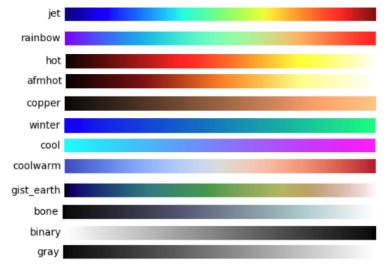
Very frequently used color maps are:

![](https://user-images.githubusercontent.com/32848391/50738804-577e1680-11d8-11e9-929e-fca17a8ac6f3.jpg)

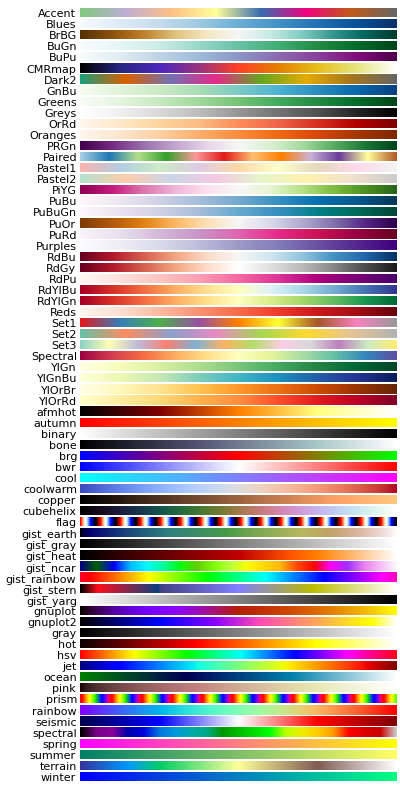
A more complete color maps list:

![](https://matplotlib.org/1.2.1/_images/show_colormaps.png)

.. note:: Can also directly use and customize a matplotlib color map

Examples:

import matplotlib
from vedo import color_map
rgb = color_map(0.2, matplotlib.colormaps["jet"], 0, 1)
print("rgb =", rgb)  # [0.0, 0.3, 1.0]

Examples:
Source code in vedo/colors.py
902
903
904
905
906
907
908
909
910
911
912
913
914
915
916
917
918
919
920
921
922
923
924
925
926
927
928
929
930
931
932
933
934
935
936
937
938
939
940
941
942
943
944
945
946
947
948
949
950
951
952
953
954
955
956
957
958
959
960
961
962
963
964
965
966
967
968
969
970
971
972
973
974
975
976
977
978
979
980
981
982
983
def color_map(value, name="jet", vmin=None, vmax=None):
    """
    Map a real value in range [vmin, vmax] to a (r,g,b) color scale.

    Return the (r,g,b) color, or a list of (r,g,b) colors.

    Args:
        value (float, list):
            scalar value to transform into a color
        name (str, matplotlib.colors.LinearSegmentedColormap):
            color map name

    Very frequently used color maps are:

        ![](https://user-images.githubusercontent.com/32848391/50738804-577e1680-11d8-11e9-929e-fca17a8ac6f3.jpg)

    A more complete color maps list:

        ![](https://matplotlib.org/1.2.1/_images/show_colormaps.png)

    .. note:: Can also directly use and customize a matplotlib color map

    Examples:
        ```python
        import matplotlib
        from vedo import color_map
        rgb = color_map(0.2, matplotlib.colormaps["jet"], 0, 1)
        print("rgb =", rgb)  # [0.0, 0.3, 1.0]
        ```

    Examples:
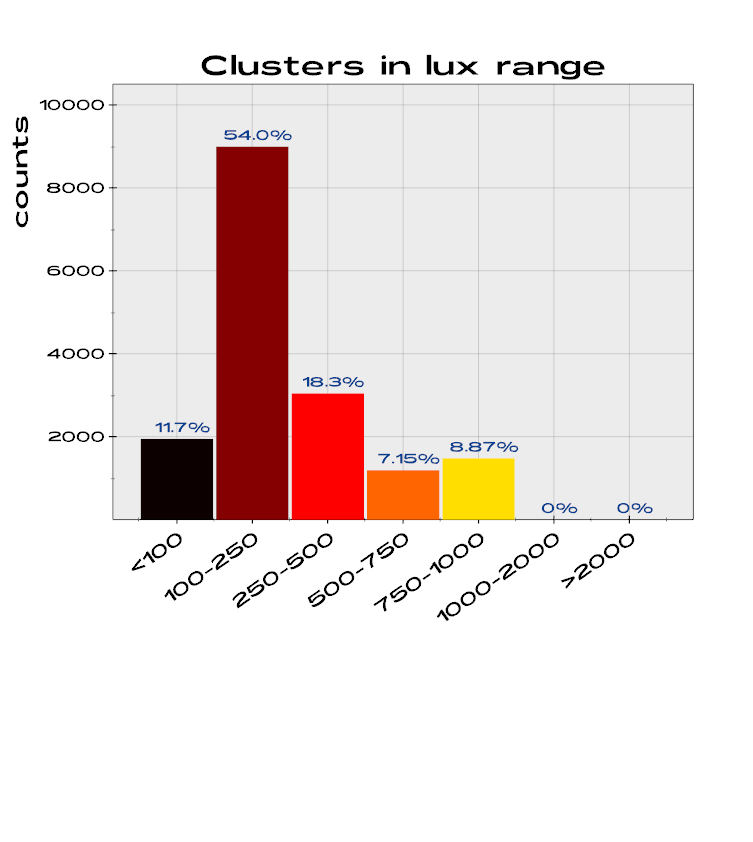
        - [plot_bars.py](https://github.com/marcomusy/vedo/tree/master/examples/pyplot/plot_bars.py)

            <img src="https://vedo.embl.es/images/pyplot/plot_bars.png" width="400"/>

    """
    is_array = _is_sequence(value)

    if is_array:
        values = np.asarray(value, dtype=float)
        if vmin is None:
            vmin = np.min(values)
        if vmax is None:
            vmax = np.max(values)
        values = np.clip(values, vmin, vmax)
        denom = vmax - vmin
        if denom == 0:
            values = np.zeros_like(values)
        else:
            values = (values - vmin) / denom
    else:
        if vmin is None:
            vedo.logger.warning("in color_map() you must specify vmin! Assume 0.")
            vmin = 0
        if vmax is None:
            vedo.logger.warning("in color_map() you must specify vmax! Assume 1.")
            vmax = 1
        if vmax == vmin:
            values = [0.0]
        else:
            values = [(value - vmin) / (vmax - vmin)]

    _setup_colormaps()

    if isinstance(name, str):
        try:
            mp = matplotlib.colormaps[name]
        except KeyError:
            vedo.logger.error(f"in color_map(), no color map with name '{name}'")
            vedo.logger.error(
                f"Available color maps are:\n{list(matplotlib.colormaps.keys())}"
            )
            if is_array:
                return np.full((len(values), 3), 0.5)
            return (0.5, 0.5, 0.5)
    else:
        mp = name  # assume matplotlib.colors.LinearSegmentedColormap
    result = mp(values)[:, [0, 1, 2]]

    if is_array:
        return result
    return result[0]

get_color(rgb=None, hsv=None)

Convert a color or list of colors to (r,g,b) format from many different input formats.

Set hsv to input as (hue, saturation, value).

Examples:

  • RGB = (255, 255, 255) corresponds to white
  • rgb = (1,1,1) is again white
  • hex = #FFFF00 is yellow
  • string = 'white'
  • string = 'w' is white nickname
  • string = 'dr' is darkred
  • string = 'red4' is a shade of red
  • int = 7 picks color nr. 7 in a predefined color list
  • int = -7 picks color nr. 7 in a different predefined list

Examples:

Source code in vedo/colors.py
791
792
793
794
795
796
797
798
799
800
801
802
803
804
805
806
807
808
809
810
811
812
813
814
815
816
817
818
819
820
821
822
823
824
825
826
827
828
829
830
831
832
833
834
835
836
837
838
839
840
841
842
843
844
845
846
def get_color(rgb=None, hsv=None):
    """
    Convert a color or list of colors to (r,g,b) format from many different input formats.

    Set `hsv` to input as (hue, saturation, value).

    Examples:
         - `RGB    = (255, 255, 255)` corresponds to white
         - `rgb    = (1,1,1)` is again white
         - `hex    = #FFFF00` is yellow
         - `string = 'white'`
         - `string = 'w'` is white nickname
         - `string = 'dr'` is darkred
         - `string = 'red4'` is a shade of red
         - `int    =  7` picks color nr. 7 in a predefined color list
         - `int    = -7` picks color nr. 7 in a different predefined list


    Examples:
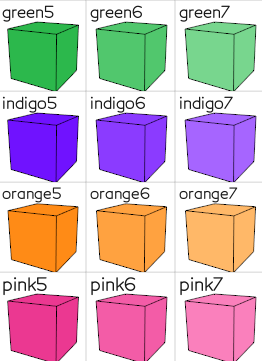
        - [colorcubes.py](https://github.com/marcomusy/vedo/tree/master/examples/basic/colorcubes.py)

            ![](https://vedo.embl.es/images/basic/colorcubes.png)
    """
    # recursion, return a list if input is list of colors:
    if _is_sequence(rgb):
        try:
            if len(rgb) == 0:
                return (0.5, 0.5, 0.5)
            if _is_sequence(rgb[0]) or isinstance(rgb[0], str) or len(rgb) > 4:
                return [get_color(sc) for sc in rgb]
        except (TypeError, IndexError):
            pass

    if isinstance(rgb, str):
        try:
            rgb = int(rgb)
        except (ValueError, TypeError):
            pass

    c = hsv2rgb(hsv) if hsv is not None else rgb

    if _is_sequence(c):
        arr = np.asarray(c, dtype=float)
        if arr.size < 3:
            return (0.5, 0.5, 0.5)
        if np.max(arr[:3]) <= 1:
            return tuple(arr.tolist())
        return tuple((arr / 255.0).tolist())

    if isinstance(c, str):
        return _get_color_from_string(c)

    if isinstance(c, (int, float, np.number)):  # color number
        return palettes[vedo.settings.palette % len(palettes)][abs(int(c)) % 10]

    return (0.5, 0.5, 0.5)

get_color_name(c)

Find the name of the closest color.

Source code in vedo/colors.py
849
850
851
852
853
854
855
856
857
858
859
860
861
862
863
864
def get_color_name(c) -> str:
    """Find the name of the closest color."""
    global _colors_rgb_cache
    c = np.array(get_color(c))[:3]  # reformat to rgb
    if _colors_rgb_cache is None:
        _colors_rgb_cache = {
            key: np.array(_get_color_from_string(key))[:3] for key in colors
        }
    mdist = 99.0
    kclosest = ""
    for key, ci in _colors_rgb_cache.items():
        d = np.linalg.norm(c - ci)
        if d < mdist:
            mdist = d
            kclosest = key
    return kclosest

hex2rgb(hx)

Convert Hex to rgb color.

Source code in vedo/colors.py
897
898
899
def hex2rgb(hx: str) -> list:
    """Convert Hex to rgb color."""
    return _hex_to_rgb_cached(hx)

hsv2rgb(hsv)

Convert HSV to RGB color.

Source code in vedo/colors.py
877
878
879
880
881
def hsv2rgb(hsv: list) -> list:
    """Convert HSV to RGB color."""
    rgb = [0, 0, 0]
    _get_vtk_math().HSVToRGB(hsv, rgb)
    return rgb

printc(*strings, c=None, bc=None, bold=True, italic=False, blink=False, underline=False, strike=False, dim=False, invert=False, box='', link='', end='\n', flush=True, delay=0, return_string=False)

Print to terminal in color (any color!).

Parameters:

Name Type Description Default
c color

foreground color name or (r,g,b)

None
bc color

background color name or (r,g,b)

None
bold bool

boldface [True]

True
italic bool

italic [False]

False
blink bool

blinking text [False]

False
underline bool

underline text [False]

False
strike bool

strike through text [False]

False
dim bool

make text look dimmer [False]

False
invert bool

invert background and forward colors [False]

False
box bool

print a box with specified text character ['']

''
link str

print a clickable url link (works on Linux) (must press Ctrl+click to open the link)

''
flush bool

flush buffer after printing [True]

True
delay float

print only every delay seconds

0
return_string bool

return the string without printing it [False]

False
end str

the end character to be printed [newline]

'\n'

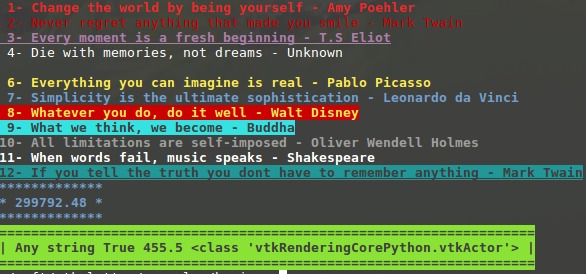
Examples:

from vedo.colors import printc
printc('anything', c='tomato', bold=False, end=' ')
printc('anything', 455.5, c='lightblue')
printc(299792.48, c=4)

Examples:
Source code in vedo/colors.py
1125
1126
1127
1128
1129
1130
1131
1132
1133
1134
1135
1136
1137
1138
1139
1140
1141
1142
1143
1144
1145
1146
1147
1148
1149
1150
1151
1152
1153
1154
1155
1156
1157
1158
1159
1160
1161
1162
1163
1164
1165
1166
1167
1168
1169
1170
1171
1172
1173
1174
1175
1176
1177
1178
1179
1180
1181
1182
1183
1184
1185
1186
1187
1188
1189
1190
1191
1192
1193
1194
1195
1196
1197
1198
1199
1200
1201
1202
1203
1204
1205
1206
1207
1208
1209
1210
1211
1212
1213
1214
1215
1216
1217
1218
1219
1220
1221
1222
1223
1224
1225
1226
1227
1228
1229
1230
1231
1232
1233
1234
1235
1236
1237
1238
1239
1240
1241
1242
1243
1244
1245
1246
1247
1248
1249
1250
1251
1252
1253
1254
1255
1256
1257
1258
1259
1260
1261
1262
1263
1264
1265
1266
1267
1268
1269
1270
1271
1272
1273
1274
1275
1276
1277
1278
1279
1280
1281
1282
1283
1284
1285
1286
1287
1288
1289
1290
1291
1292
1293
1294
1295
1296
1297
1298
1299
1300
1301
1302
1303
1304
1305
1306
1307
1308
1309
1310
1311
1312
1313
1314
1315
1316
1317
1318
1319
def printc(
    *strings,
    c=None,
    bc=None,
    bold=True,
    italic=False,
    blink=False,
    underline=False,
    strike=False,
    dim=False,
    invert=False,
    box="",
    link="",
    end="\n",
    flush=True,
    delay=0,
    return_string=False,
):
    """
    Print to terminal in color (any color!).

    Args:
        c (color):
            foreground color name or (r,g,b)
        bc (color):
            background color name or (r,g,b)
        bold (bool):
            boldface [True]
        italic (bool):
            italic [False]
        blink (bool):
            blinking text [False]
        underline (bool):
            underline text [False]
        strike (bool):
            strike through text [False]
        dim (bool):
            make text look dimmer [False]
        invert (bool):
            invert background and forward colors [False]
        box (bool):
            print a box with specified text character ['']
        link (str):
            print a clickable url link (works on Linux)
            (must press Ctrl+click to open the link)
        flush (bool):
            flush buffer after printing [True]
        delay (float):
            print only every `delay` seconds
        return_string (bool):
            return the string without printing it [False]
        end (str):
            the end character to be printed [newline]

    Examples:
        ```python
        from vedo.colors import printc
        printc('anything', c='tomato', bold=False, end=' ')
        printc('anything', 455.5, c='lightblue')
        printc(299792.48, c=4)
        ```

    Examples:
        - [printc.py](https://github.com/marcomusy/vedo/tree/master/examples/extras/printc.py)

        ![](https://user-images.githubusercontent.com/32848391/50739010-2bfc2b80-11da-11e9-94de-011e50a86e61.jpg)
    """

    if delay:
        tm = time()
        if tm - _printc_delay_timestamp[0] > delay:
            _printc_delay_timestamp[0] = tm
        else:
            return ""  # skip print

    if not vedo.settings.enable_print_color or not _terminal_has_colors:
        if return_string:
            return "".join(map(str, strings))
        else:
            print(*strings, end=end, flush=flush)
            return ""

    try:  # -------------------------------------------------------------
        txt = str()
        ns = len(strings) - 1
        separator = " "
        offset = 0
        for i, s in enumerate(strings):
            if i == ns:
                separator = ""
            if ":" in repr(s):
                for k in emoji:
                    if k in str(s):
                        s = s.replace(k, emoji[k])
                        offset += 1
                for k, rp in vedo.shapes._reps:  # check symbols in shapes._reps
                    if k in str(s):
                        s = s.replace(k, rp)
                        offset += 1

            txt += str(s) + separator

        special, cseq = "", ""
        oneletter_colors = {
            "k": "\u001b[30m",  # because these are supported by most terminals
            "r": "\u001b[31m",
            "g": "\u001b[32m",
            "y": "\u001b[33m",
            "b": "\u001b[34m",
            "m": "\u001b[35m",
            "c": "\u001b[36m",
            "w": "\u001b[37m",
        }

        if c is not None:
            if c is True:
                c = "g"
            elif c is False:
                c = "r"

            if isinstance(c, str) and c in oneletter_colors:
                cseq += oneletter_colors[c]
            else:
                r, g, b = get_color(c)  # not all terms support this syntax
                cseq += f"\x1b[38;2;{int(r * 255)};{int(g * 255)};{int(b * 255)}m"

        if bc:
            if bc in oneletter_colors:
                cseq += oneletter_colors[bc]
            else:
                r, g, b = get_color(bc)
                cseq += f"\x1b[48;2;{int(r * 255)};{int(g * 255)};{int(b * 255)}m"

        if box is True:
            box = "-"
        if underline and not box:
            special += "\x1b[4m"
        if strike and not box:
            special += "\x1b[9m"
        if dim:
            special += "\x1b[2m"
        if invert:
            special += "\x1b[7m"
        if bold:
            special += "\x1b[1m"
        if italic:
            special += "\x1b[3m"
        if blink:
            special += "\x1b[5m"

        if box and "\n" not in txt:
            box = box[0]
            boxv = box
            if box in ["_", "=", "-", "+", "~"]:
                boxv = "|"

            if box in ("_", "."):
                outtxt = special + cseq + " " + box * (len(txt) + offset + 2) + " \n"
                outtxt += boxv + " " * (len(txt) + 2) + boxv + "\n"
            else:
                outtxt = special + cseq + box * (len(txt) + offset + 4) + "\n"

            outtxt += boxv + " " + txt + " " + boxv + "\n"

            if box == "_":
                outtxt += "|" + box * (len(txt) + offset + 2) + "|" + reset + end
            else:
                outtxt += box * (len(txt) + offset + 4) + reset + end

            sys.stdout.write(outtxt)

        else:
            out = special + cseq + txt + reset

            if link:
                # embed a link in the terminal
                out = f"\x1b]8;;{link}\x1b\\{out}\x1b]8;;\x1b\\"

            if return_string:
                return out + end
            else:
                sys.stdout.write(out + end)

    except Exception:  # ----------------------------------------- fallback
        if return_string:
            return "".join(map(str, strings))

        try:
            print(*strings, end=end)
        except UnicodeEncodeError as e:
            print(e, end=end)

    if flush:
        sys.stdout.flush()
    return ""

printd(*strings, q=False)

Print debug information about the environment where the printd() is called. Local variables are printed out with their current values.

Use q to quit (exit) the python session after the printd call.

Source code in vedo/colors.py
1322
1323
1324
1325
1326
1327
1328
1329
1330
1331
1332
1333
1334
1335
1336
1337
1338
1339
1340
1341
1342
1343
1344
1345
1346
1347
1348
1349
1350
1351
1352
1353
1354
1355
1356
1357
1358
1359
1360
1361
1362
1363
1364
1365
1366
1367
1368
1369
1370
1371
1372
1373
1374
1375
1376
1377
1378
def printd(*strings, q=False):
    """
    Print debug information about the environment where the printd() is called.
    Local variables are printed out with their current values.

    Use `q` to quit (exit) the python session after the printd call.
    """
    from inspect import currentframe, getframeinfo

    cf = currentframe().f_back
    cfi = getframeinfo(cf)

    fname = os.path.basename(getframeinfo(cf).filename)
    print(
        "\x1b[7m\x1b[3m\x1b[37m" + fname + " line:\x1b[1m" + str(cfi.lineno) + reset,
        end="",
    )
    print("\x1b[3m\x1b[37m\x1b[2m", "\U00002501" * 30, ctime(), reset)
    if strings:
        print("    \x1b[37m\x1b[1mMessage : ", *strings)
    print("    \x1b[37m\x1b[1mFunction:\x1b[0m\x1b[37m " + str(cfi.function))
    print("    \x1b[1mLocals  :" + reset)
    for loc in cf.f_locals.keys():
        obj = cf.f_locals[loc]
        var = repr(obj)
        if "module " in var:
            continue
        if "function " in var:
            continue
        if "class " in var:
            continue
        if loc.startswith("_"):
            continue
        if hasattr(obj, "name") and hasattr(obj, "GetPosition"):
            oname = str(obj.name) if obj.name else str(type(obj))
            var = oname + ", at " + vedo.utils.precision(obj.GetPosition(), 3)

        var = var.replace("vtkmodules.", "")
        print("      \x1b[37m", loc, "\t\t=", var[:60].replace("\n", ""), reset)
        if vedo.utils.is_sequence(obj) and len(obj) > 4:
            try:
                print(
                    "           \x1b[37m\x1b[2m\x1b[3m len:",
                    len(obj),
                    " min:",
                    vedo.utils.precision(min(obj), 4),
                    " max:",
                    vedo.utils.precision(max(obj), 4),
                    reset,
                )
            except (TypeError, ValueError):
                pass

    if q:
        print(f"    \x1b[1m\x1b[37mExiting python now (q={bool(q)}).\x1b[0m\x1b[37m")
        sys.exit(0)
    sys.stdout.flush()

rgb2hex(rgb)

Convert RGB to Hex color.

Source code in vedo/colors.py
891
892
893
894
def rgb2hex(rgb: list) -> str:
    """Convert RGB to Hex color."""
    arr = np.clip(np.asarray(rgb, dtype=float)[:3], 0, 1)
    return "#%02x%02x%02x" % (round(arr[0] * 255), round(arr[1] * 255), round(arr[2] * 255))

rgb2hsv(rgb)

Convert RGB to HSV color.

Source code in vedo/colors.py
884
885
886
887
888
def rgb2hsv(rgb: list) -> list:
    """Convert RGB to HSV color."""
    hsv = [0, 0, 0]
    _get_vtk_math().RGBToHSV(get_color(rgb), hsv)
    return hsv